Iranian Contact Data Pipeline
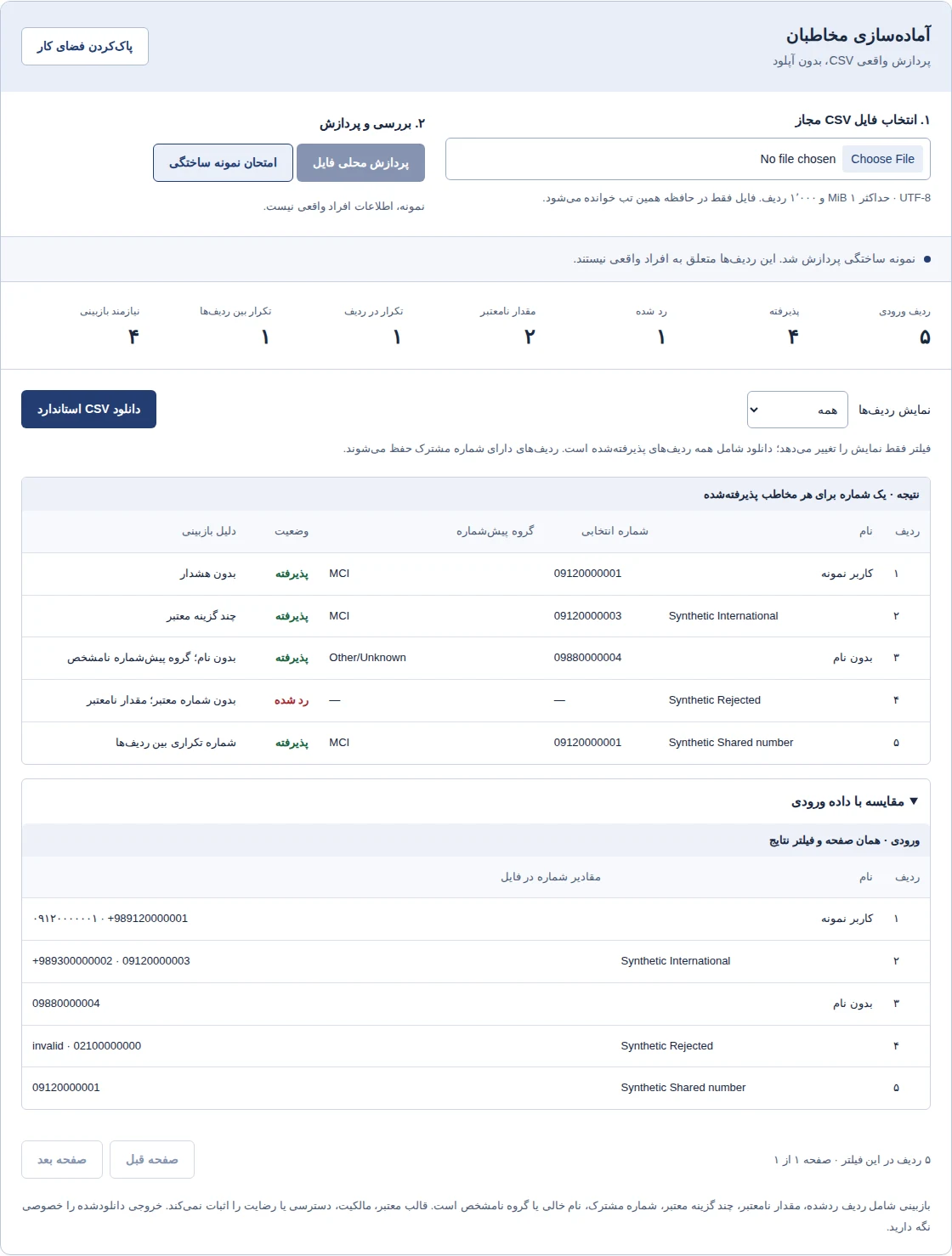
A real browser-local CSV tool and supported Python CLI for preparing Iranian contact records. Normalize phone formats, select one mobile value per accepted contact, review quality and warnings, and download normalized CSV without uploading your file.
The workbench reads a user-selected CSV entirely in tab memory: never uploaded, sent to analytics, or stored in persistent browser storage. Use only authorized data. Downloading creates a local file; reset does not guarantee erasure of browser or operating-system artifacts.
What this product offers
A useful browser experience with clear boundaries.
The page identifies where computation runs, what data it uses, and which external services are outside its scope.
- 01Read an authorized UTF-8 CSV locally, or try the fictional sample
- 02Normalize supported Iranian local/international formats and Persian/Arabic digits
- 03Reject malformed values and select by MCI, Irancell, Rightel, then unknown priority
- 04Suppress duplicate candidates within each contact; report shared selections across rows without merging people
- 05Inspect accepted, rejected, and review-bearing records in a Persian RTL workbench
- 06Download normalized CSV with four documented columns and browser formula-escaping safeguards
A short guided path
From first input to useful output.
Explore the product, then review its implementation or source attribution.
- 01Choose a local CSV or fictional sample
- 02Process supported fields locally
- 03Review quality, selection reasons, and before/after values
- 04Download all accepted rows as normalized CSV
Local installation
Run the real software in an environment you control.
These steps reflect the repository's public setup documentation. Review its README for platform-specific details and the latest operational guidance.
Prerequisites
- Python 3.9–3.14
- A private local directory and an authorized UTF-8 CSV
Setup outline
git clone https://github.com/AlirezaBelal/iran-contact-data-pipeline.gitcd iran-contact-data-pipelinepython -m venv .venvLinux/macOS: source .venv/bin/activate · PowerShell: .venv\Scripts\Activate.ps1python -m pip install -e .contact-cleaner examples/contacts.example.csv outputs/cleaned.csv
- The bundled CLI example is synthetic. The CLI supports 50 MiB and 100,000 rows; the browser supports 1 MiB and 1,000 rows.
- CLI outputs publish atomically and refuse existing files unless --overwrite is explicit. Keep inputs, outputs, and backups private.
- Core rules are parity-tested. Browser export prefixes formula-like names with an apostrophe; CLI preserves names. Import CSV columns as text.
Scope & trust
Know what the tool does with your data.
The workbench reads a user-selected CSV entirely in tab memory: never uploaded, sent to analytics, or stored in persistent browser storage. Use only authorized data. Downloading creates a local file; reset does not guarantee erasure of browser or operating-system artifacts.
- Browser: 1 MiB, 1,000 rows, UTF-8 CSV, required First Name / Last Name / Phone 1 - Value headers; optional Phone 2–4 fields
- Separate contacts sharing a number remain separate records; repeated counts measure occurrences after the first
- Prefix labels cannot establish current carrier, ownership, reachability, consent, or messaging permission
- No uploads, accounts, contact analytics, persistent contact storage, SMS, or backend; downloaded files require private handling
Continue to the product
Try the browser tool, then inspect the source.
This product overview remains available even if an external application is temporarily unavailable.