Myket Crawler
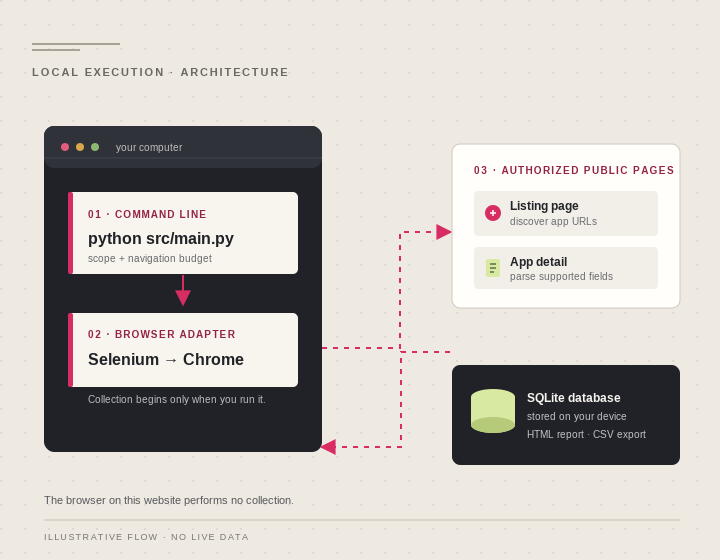
A local Python and Selenium crawler for collecting permitted public Myket app metadata into SQLite. Its standalone product website explains the real software and local installation; it does not crawl or analyze data in the browser.
This portfolio and its linked product website are static project information. They do not run Selenium, access Myket, or accept datasets. The crawler and SQLite data stay on the user’s computer.
Product capabilities
A focused tool designed to run in your environment.
The standalone site is a static product guide. Install and run the crawler from its public source repository for the actual collection workflow.
- 01Deliberately start bounded Selenium navigation
- 02Discover supported public app and game metadata
- 03Validate package identity and handle duplicates
- 04Store records locally in SQLite
- 05Generate a Persian RTL HTML report and spreadsheet-safe CSV offline
Operating workflow
Install, configure, and run it locally.
Configuration and execution happen in your own environment. Review the project README and security guidance before enabling integrations.
- 01Install the Python project
- 02Try fictional records offline
- 03Choose a permitted, bounded collection scope
- 04Review SQLite and generated outputs locally
Local installation
Run the real software in an environment you control.
These steps reflect the repository's public setup documentation. Review its README for platform-specific details and the latest operational guidance.
Prerequisites
- Python 3.9 or newer
- Chrome or Chromium for an explicitly started collection
- Permission to access and use the selected public pages
Setup outline
git clone https://github.com/AlirezaBelal/myket-crawler.gitcd myket-crawlerpython -m venv .venvpython -m pip install -r requirements.txtpython src/main.py --demoOpen data/demo-report.html
- The offline demo creates fictional records without launching Selenium or making network requests.
- Windows, macOS, and Linux setup details are in the repository README.
- Before any live collection, confirm applicable access rules and use conservative limits. The navigation budget counts Selenium driver.get() calls, not browser subrequests or redirects.
Scope & trust
Know how the local software operates.
This portfolio and its linked product website are static project information. They do not run Selenium, access Myket, or accept datasets. The crawler and SQLite data stay on the user’s computer.
- No hosted crawler, marketplace connection, or browser-side dataset analysis
- Crawl limits count application navigations and do not cap page subrequests or redirects
- Collection is best-effort and does not promise complete Myket coverage
Read the product guide
Understand the workflow. Then run it locally.
The website is static documentation. Selenium collection, SQLite storage, and report generation run only on your computer.